The IG-XL agent
An agent that works where the test program lives. Open it from Excel (the ATE·IQ™ tab, or Open Agent on the Add-ins tab when IG-XL has the program loaded) and it follows the program you have open: every sheet, the VBA editor's current state with your unsaved edits, and the cell you are on. Ask what a test engineer asks: it answers with tools that compute, and every change it proposes is previewed, applied on your click, and reversible. Start from a program generated from your spec, or one you already maintain.
- Input
- A small motion sensor with a 4-wire SPI interface; the lots are synthetic with defects planted on purpose.
- What ran
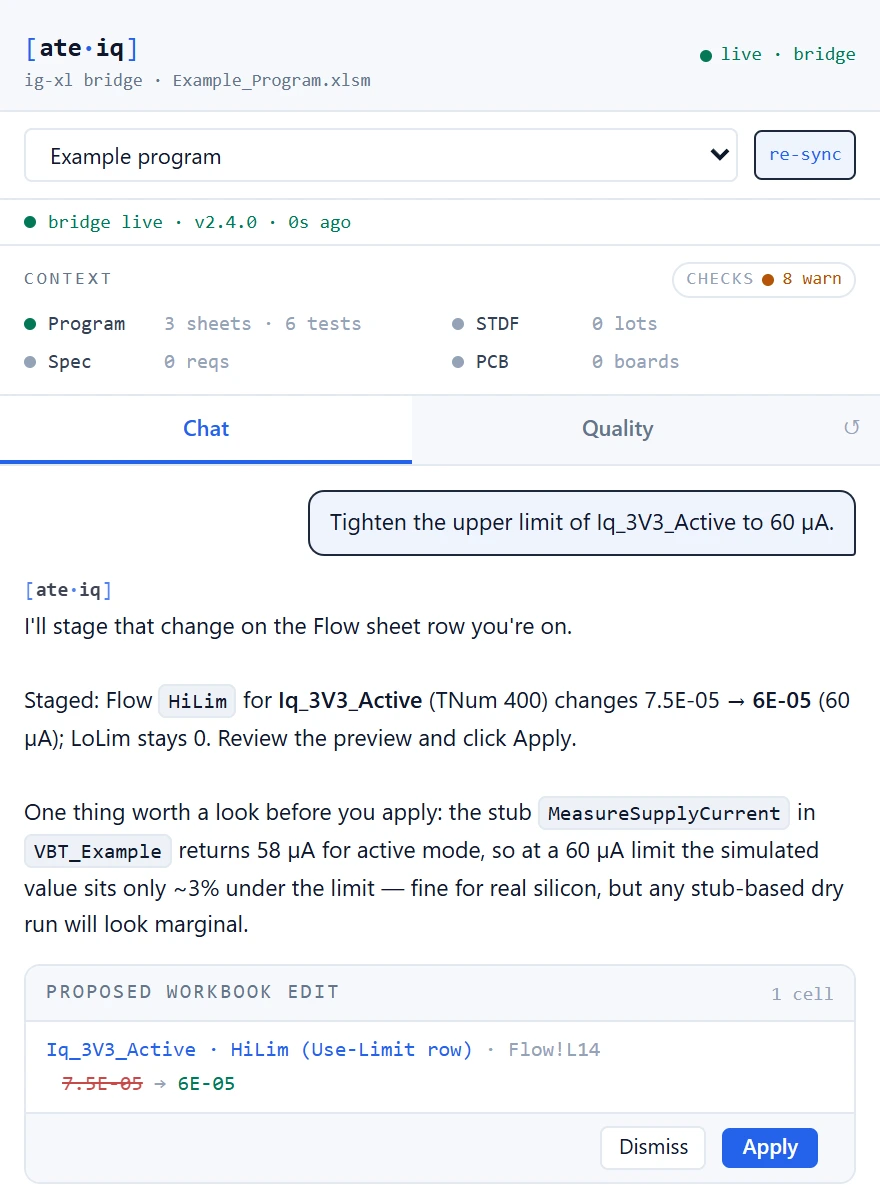
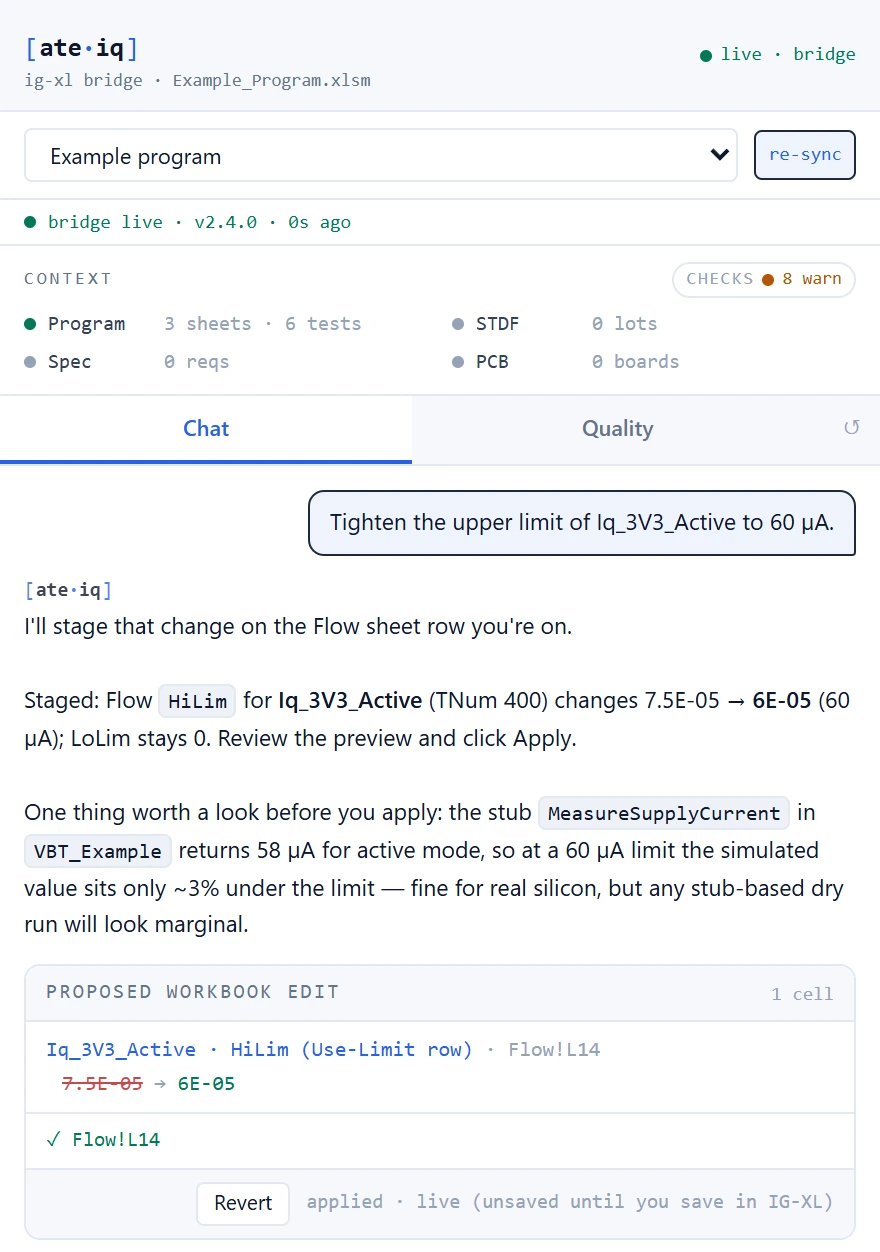
- Live sheets, VBA and the engineer's cursor, streamed from the loaded program. A one-cell limit change applied inside Excel by the add-in, then reverted.
- What it found
- Did the guard band reach the program and the lots? Spec, flow limit and the limit each lot ran, side by side, with the owner of each mismatch named. Why is this lot failing? The STDF tools answer it: yield by site and bin, first-fail paretos and Cpk for the lot named, and a cause chain for the test you name. On the demonstration lots, two summary figures in the answer did not match the tools. The tools compute their figures deterministically, but the answer around them is written by the model, so check a figure that matters against the tool itself.
Where it lives
| Where | What you get |
|---|---|
| In Excel | One ribbon tab (Open Agent, Open IDE, Sync now, Bridge status) and a window beside the workbook. The add-in binds to whichever program you open, so in plain Excel there is nothing to configure per test program. |
| In IG-XL | IG-XL starts Excel without global add-ins, so the program's References sheet names the ATE·IQ add-in once, and Open Agent sits on Excel's Add-ins tab. With the program loaded, the agent follows it live: its sheets, its VBA and your cursor. |
| On the desktop | ATE·IQ Chat runs the same agent with the whole project behind it, and a Live Workbook view lets you pick a test, module or sheet and ask about exactly that. |
| Install | Per user, no administrator rights. If your organisation's policy locks access to VBA projects, the installer tells you so instead of failing silently. |
It sees what you see
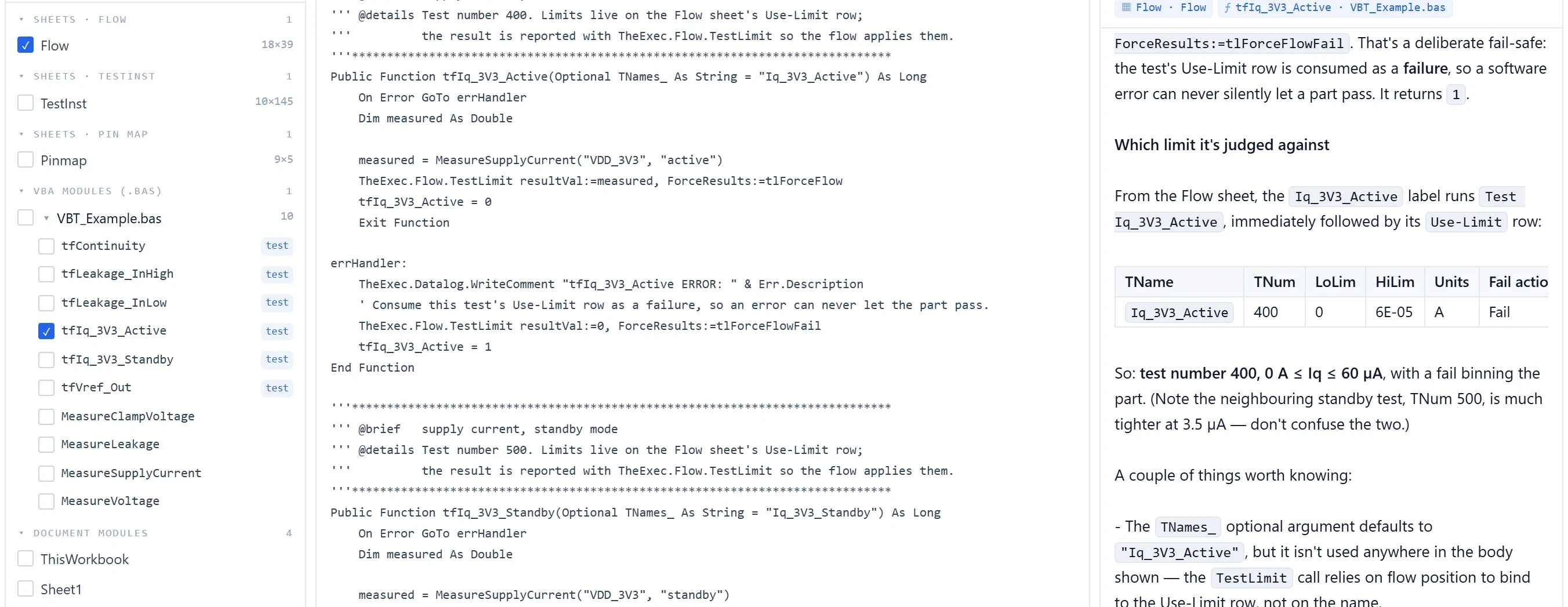
Answers start from the program on your screen, not from an export or a copy saved an hour ago. The add-in streams the open program's sheets while it is connected, reads the VBA editor's current state (unsaved edits included, even for a program IG-XL has loaded and nobody has saved), and carries the sheet and cell you are on, so "this limit" means the one you selected. Each question gets only the sheets and procedures it concerns; when something is left out for size, the agent says so. Reading the workbook stores it in the project, so the Excel window, the desktop chat, the code map and traceability all work from the same program. Every figure from a lot, spec or board carries a citation to its source (a link in ATE·IQ Chat), and a procedure or sheet it has not read is named as unread rather than guessed at.
What you can ask
“Tighten this limit to 60 µA.”
It resolves “this limit” from your cursor, stages the change on the row IG-XL reads limits from, and shows the before and after. You apply it; Revert puts it back.
“What does this VBT procedure do?”
It reads the procedure's real source from the open editor and checks IG-XL API and instrument facts in its built-in knowledge.
“Write a helper module for this test.”
It drafts the VBA, checks it against the IG-XL API before proposing it, and stages the whole module for your review.
“Adapt our standard leakage test for this part.”
Point it at your team's own method library, a linked git repository of trusted VBT, and it finds the method by subject or name, reads it in full and stages it adapted to this program's pins.
“Did the spec's new limits reach the program and the lots?”
Spec, flow limit and the limit each lot ran, side by side, with the owner of each mismatch named.
“Why is this lot failing?”
Yield by site and bin, first-fail paretos, Cpk and outlier screens from the STDF itself, and a cause chain for the test you name.
“Propose limits from the latest lot.”
Proposals computed from lot statistics, each classified tighten, widen or leave alone. It never writes a limit.
“Will this program compile?”
ATE·IQ's offline pre-flight on the open program, with what was checked and what only IG-XL itself can confirm.
“Does the board still match the program?”
The program's pins against the bound board's nets, and the channel plan through the 166-rule DIB checker.
“Review this VBA.”
33 rules review the modules, with findings at the exact line and a development or production profile to match the stage you are at.
Edits you approve
The agent proposes; you decide. Nothing is written to the workbook until you click Apply. A proposal is a sheet field, a block of cells or a whole VBA module; it is previewed with its before, after and validation findings — a VBA change that introduces an error blocks Apply until it is fixed; an ambiguous target is refused, not guessed. Apply waits for the add-in to confirm each write, Revert puts the previous values back, and the add-in never saves the workbook: saving stays your decision.
Two modes, 39 tools
The agent window opens in Edit mode, with 13 tools: the IG-XL knowledge tools, the workbook editor, the procedure reader, the search of your team's own method library and the Quality tab's findings, fast and focused on the program in front of you. Switch to Debug mode and it has all 39 tools and the project behind it: production data, spec compliance, coverage, the load board and pre-flight. The model calls them mid-answer, and every answer lists which ones ran. While you edit, the window keeps a running count of structural and VBA findings across the live program. The Context Curator shows the slice of the project a question would send, and lets you shape it before you ask.
On the demonstration project
| Asked | Result |
|---|---|
| In IG-XL, with the program loaded | Live sheets, VBA and the engineer's cursor, streamed from the loaded program |
| Did the guard band reach the program and the lots? | Spec, flow limit and the limit each lot ran, side by side, with the owner of each mismatch named |
| Why is this lot failing? | The STDF tools answer it: yield by site and bin, first-fail paretos and Cpk for the lot named, and a cause chain for the test you name. On the demonstration lots, two summary figures in the answer did not match the tools |
| Tighten this limit | A one-cell limit change applied inside Excel by the add-in, then reverted |
Demonstration project: a small motion sensor with a 4-wire SPI interface; the lots are synthetic with defects planted on purpose.