For IG-XL test engineering teams

From spec to a checked IG-XL program.

Pick a spec and ATE·IQ writes the IG-XL program — the sheets, the VBT code and the digital patterns, with every test keyed to its requirement's test number. It checks the code, the tester setup and the limits, replays the tests against a model of the device and lists any it cannot judge, and hands you a checked project ready for IG-XL's offline simulator. Then the integrated IG-XL agent refines it with you, live in the workbook.

  • Everything that can be derived is written by code; the language model is used only where engineering judgement is needed, never for the structure of the program.
  • Judged by checkers, a device model and, when you choose, IG-XL's own offline simulator — rather than by the language model that wrote it.
  • ATE·IQ runs on your machine, and project data goes only where you point it: your LLM provider and any repository, Jama server or model endpoint you connect.
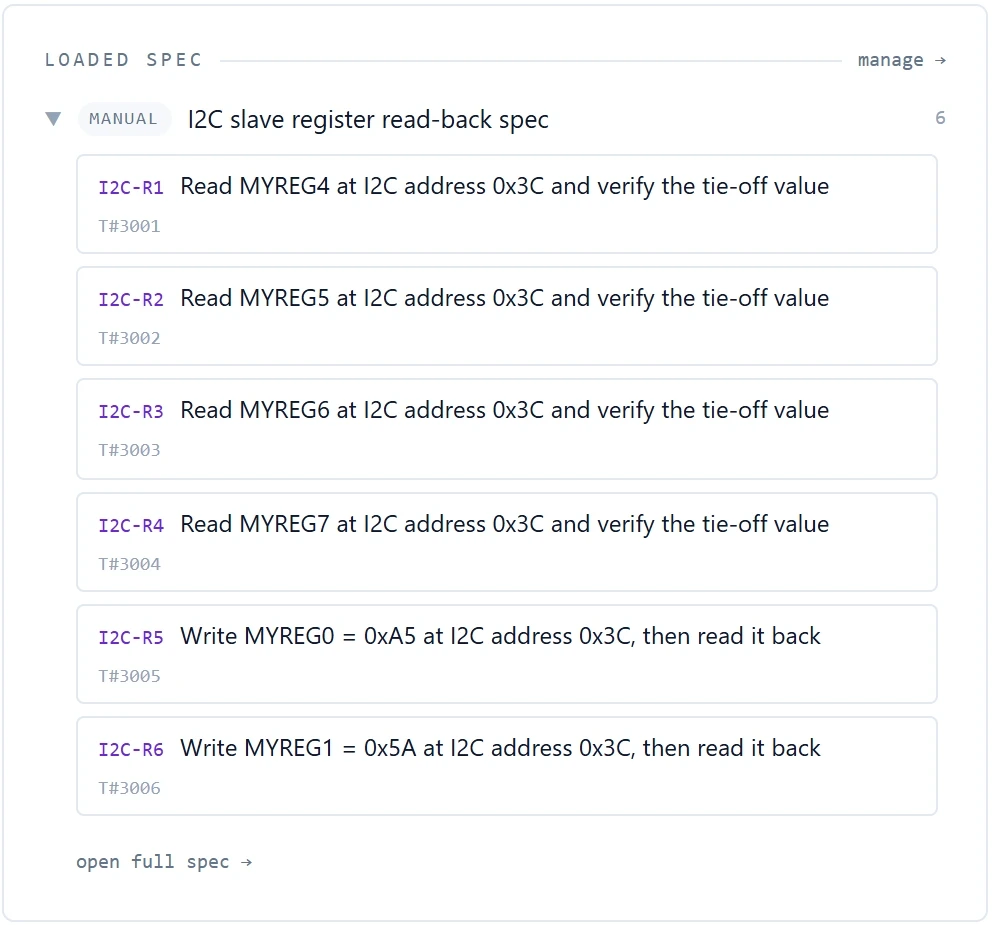
The loaded spec in the ATE·IQ Test Program Generator: six requirements, each with its test number
Pick a spec and generate: every requirement stays in view with its test number. Shown on an example project: a six-requirement read-back spec for an open-source I²C core.

Test program generation

Generate → check → verify → run.

One focused pass per requirement: serial and digital tests get a real, deterministic pattern file and the code that runs it, and DC tests get measurement code grounded in built-in IG-XL and UltraFLEX platform knowledge. Then the checkers decide, and the tests are replayed against a model of the device before you open the program.

How a program is generatedone run · every step recorded
  1. SpecRequirements with their test numbersfrom a datasheet or spec document, a requirements spreadsheet or a Jama Connect project
  2. GenerateOne focused pass per requirementthe program's structure written by code; the model used only where judgement is needed
  3. CheckVBT API, tester pre-flight, sheet structure, limits against the speca program that fails pre-flight stops there, with its findings
  4. VerifyTests replayed against a model of the deviceby default a model derived from your register map; what it cannot judge is listed, never passed
  5. Verify · RTLOptionalA model you connect judges insteadsuch as the RTL your design team already simulates, through a small adapter on your side that answers over ATE·IQ's own protocol; the model stays with you
  6. RunOptionalRun it on IG-XL's offline simulatorIG-XL loads and runs the finished program; the datalog is reconciled test by test against the model's prediction
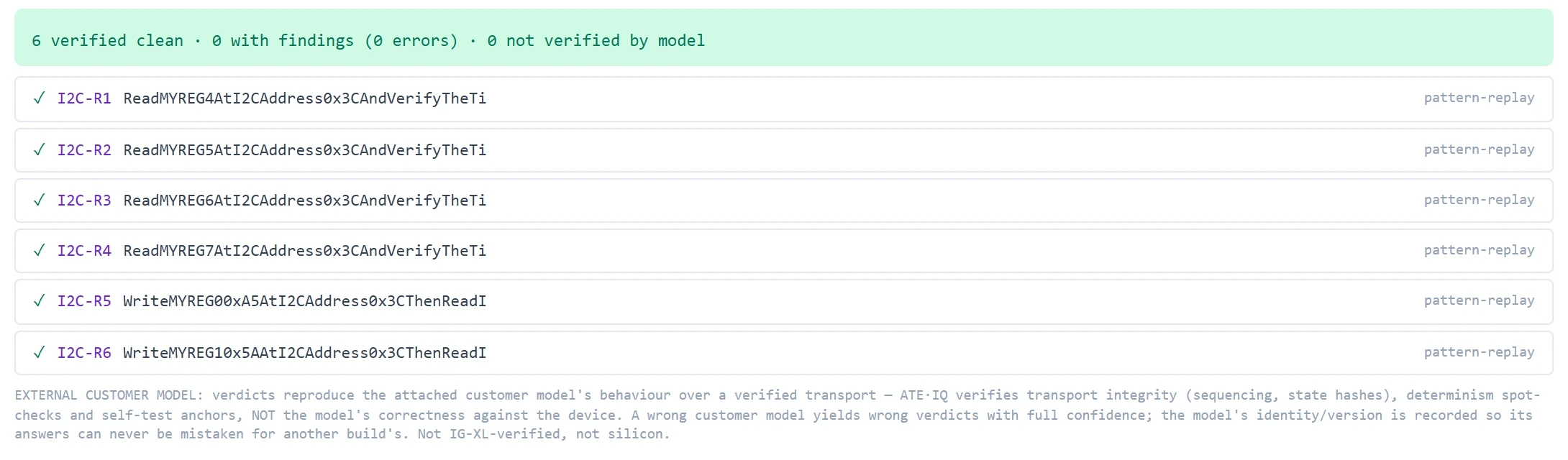
The device-model report of a run judged by a connected external model: 6 verified clean, 0 with findings, 0 not verified by model; all six tests replayed clean; and the product's note that verdicts reproduce the attached model's behaviour, not its correctness against the device
The device-model report from the example project's run, with a public open-source I²C core connected as the external model: all six tests replay clean. The note underneath is the product's own — a verdict reproduces the connected model, not the silicon. The simulator result below, 25 of 25 datalog rows as predicted, comes from the separate demonstration project, judged against its derived model.

The integrated IG-XL agent

Then refine it with the integrated IG-XL agent.

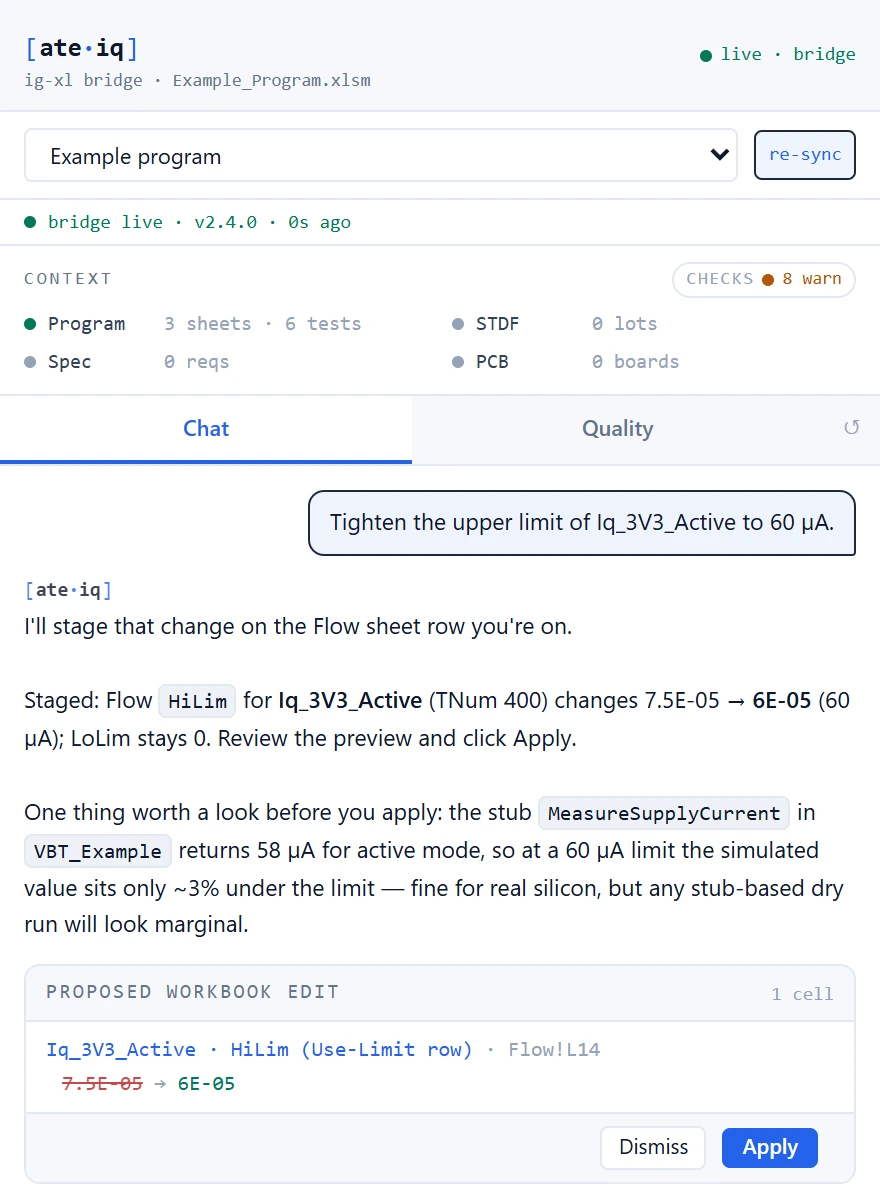
Load the generated project in IG-XL and carry on with the agent beside it. Open it from the ATE·IQ tab in Excel and it follows every sheet and the cell you are on, streamed every few seconds while connected, and re-reads the VBA editor's current state, unsaved edits included, as you work. Ask it to explain a test or change a limit: it answers with tools that compute rather than recall, stages the change with its before and after, and waits for your Apply.

  • Follows the program you have open, in Excel or loaded in IG-XL.
  • Every edit is previewed, applied on your click, and reversible.
  • VBA it drafts is checked against the IG-XL API before it is offered to you.
The ATE·IQ agent window beside Excel on Example_Program.xlsm: asked to tighten the upper limit of Iq_3V3_Active to 60 µA, it stages a one-cell change on the Flow sheet's Use-Limit row, 7.5E-05 to 6E-05 at Flow!L14, with Dismiss and Apply buttons
The agent's window beside Excel. Asked to tighten a limit, it stages the one-cell change on the Use-Limit row IG-XL reads, notes how close the example's placeholder value sits to the new limit, and waits for your Apply. Captured on an example program; its remark about real silicon is the model's own reasoning from that placeholder value, not a measurement.
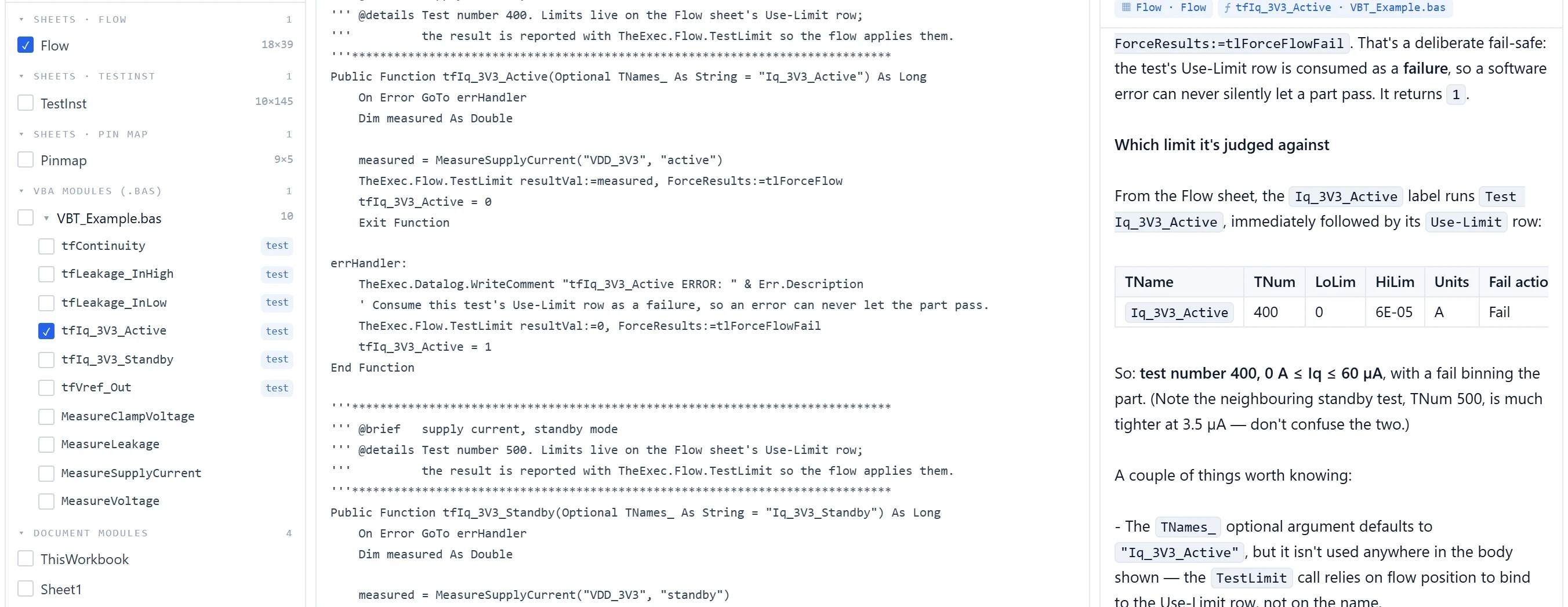
ATE·IQ Live Workbook following an example program open in Excel: the Flow sheet and one test procedure ticked in the program tree, the procedure's VBA in the viewer, and the agent's answer giving the Use-Limit row the test is judged against, test 400, 0 to 6E-05 A
Live Workbook in the desktop app, following the same example program. Two items ticked and one question asked: the agent explains the procedure from the VBA editor and reads its limit off the live Flow sheet, including the 60 µA limit once it is applied from the Excel pane above. The table in the answer is the model's rendering of that row.
The model drafts; the checkers decide.Pre-flight, the device model and IG-XL's own simulator judge the program; every join between spec, program, board and production is a deterministic engine the agent calls and explains.
IG-XL offline simulator
25 / 25 · Bin 1
datalog rows as predicted, from a generated 16-test program run by IG-XL itself¹
spec vs program
1 of 16 flagged
a spec limit tightened after generation, which the program never picked up¹
VBA review
33 rules
findings at the exact line, in Excel and on synced programs

¹ Demonstration project for a small motion sensor with a 4-wire SPI interface: synthetic data with defects planted on purpose, the tightened spec limit among them. The simulator run uses IG-XL's offline simulator with simulated instruments on one site; it is not a tester result.

Four pillars, one workspace

Spec, program, board and production — held together, checked against each other.

A production test program is never one file. The limits live in a spec, the program in an IG-XL workbook, the board in your EDA tool and the proof in STDF files — four artefacts, four owners, and the mistakes that cost a week live in the gaps between them. ATE·IQ keeps all four in one workspace, checks every hop between them, and puts the agent where it can reach all four.

Spec

The requirement

Limits, forced conditions and test numbers as typed rows — what every other pillar is checked against.

Program

Generated, then refined live

Written from the spec, checked before you open it, and edited beside you in Excel by the agent.

Board

The load board as your EDA tool wrote it

Read natively, checked against the program's pins and channel plan, copper measured before first power.

Production

The lots that prove it

STDF on your machine, joined back onto the program, the board and the spec — so a number is never judged out of context.

SPEC datasheet · Jama PROGRAM + AGENT generated · IG-XL · VBT BOARD schematic · channel map COPPER layout · DRC · fab PRODUCTION STDF · yield · Cpk lot statistics → proposed limits (never auto-applied) every hop reconciled — a limit, pin or net that drifts is flagged with its owner named
Fig. 1 — The loop. The program is generated from the spec and refined with the agent, where edits happen; every hop between the pillars is checked, and the agent can reach all of them.

The questions only the four together can answer:

“Did the spec's new limit reach the program — and the last lot?”

One answer from three sources, with the owner of each mismatch named.

“Which board part sits under the test that is trending marginal?”

From a lot's statistics to a ranked list of components to probe, before the board is on the bench.

“Does the program drive a pin the board does not carry?”

Program against board, checked before anyone powers it.

“Which requirement has a test, a net, copper and a lot behind it — and which does not?”

The whole chain per requirement, with a missing hop shown as missing, never filled in.

On the demonstration project: 16 / 16 requirements joined spec → program → lot, and the one disagreement — a spec limit tightened after generation — named with its owner. Every join is a deterministic check; the agent explains it, it does not compute it.

Load boards

Read the board your EDA tool wrote. Check it against the program.

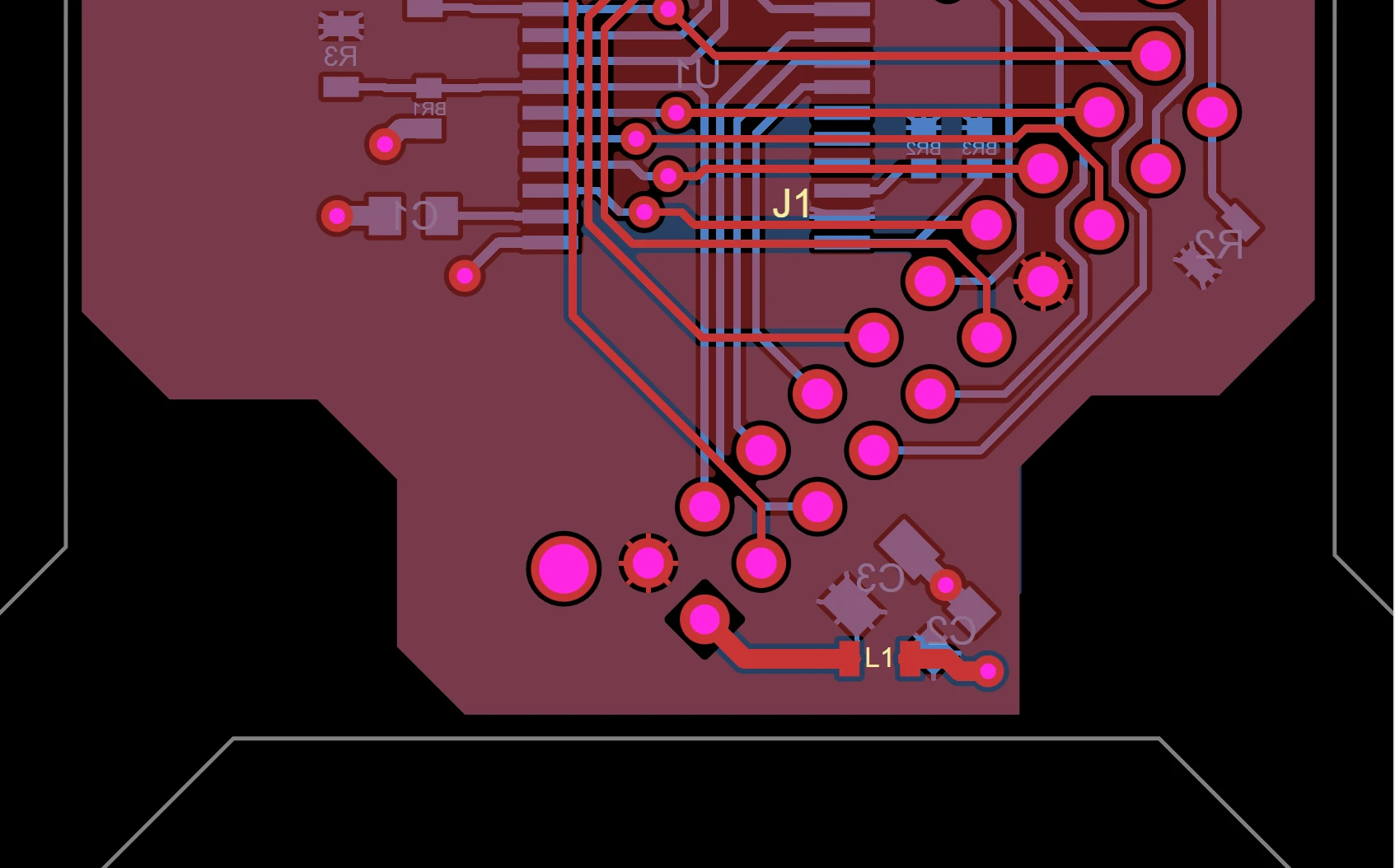
Allegro netlist and Fabmaster exports import natively, with no Cadence licence; IPC-2581, ODB++, Specctra DSN, KiCad and PDF schematics too. Every pin in the program's pin map is checked against the board's nets, the copper is measured, the 166-rule DIB check runs, and a DC operating-point check reports rail voltages at the DUT before the board is ever powered. Layout stays in your EDA tool; ATE·IQ never draws copper.

A real Allegro board, read from its Fabmaster export, in the layout tab at 3x zoom
Pin match · demonstration pin map 15 / 16 tester pins resolve on the board INDEX is the planted miss: the pin map names it, and the board has no net or pin for it.
A real Allegro 17 board, read from its public Fabmaster export, checked against a demonstration pin map that carries one planted miss.

Production data

The ground truth, parsed where it lands.

STDF V4 lots parse natively on the engineer's machine — yield by site and bin, Cpk, drift, wafer maps and outlier screens. The traceability dashboard joins every lot back onto the program and the spec and names the limit one of them no longer shares, and lot statistics become limit proposals that are never written for you.

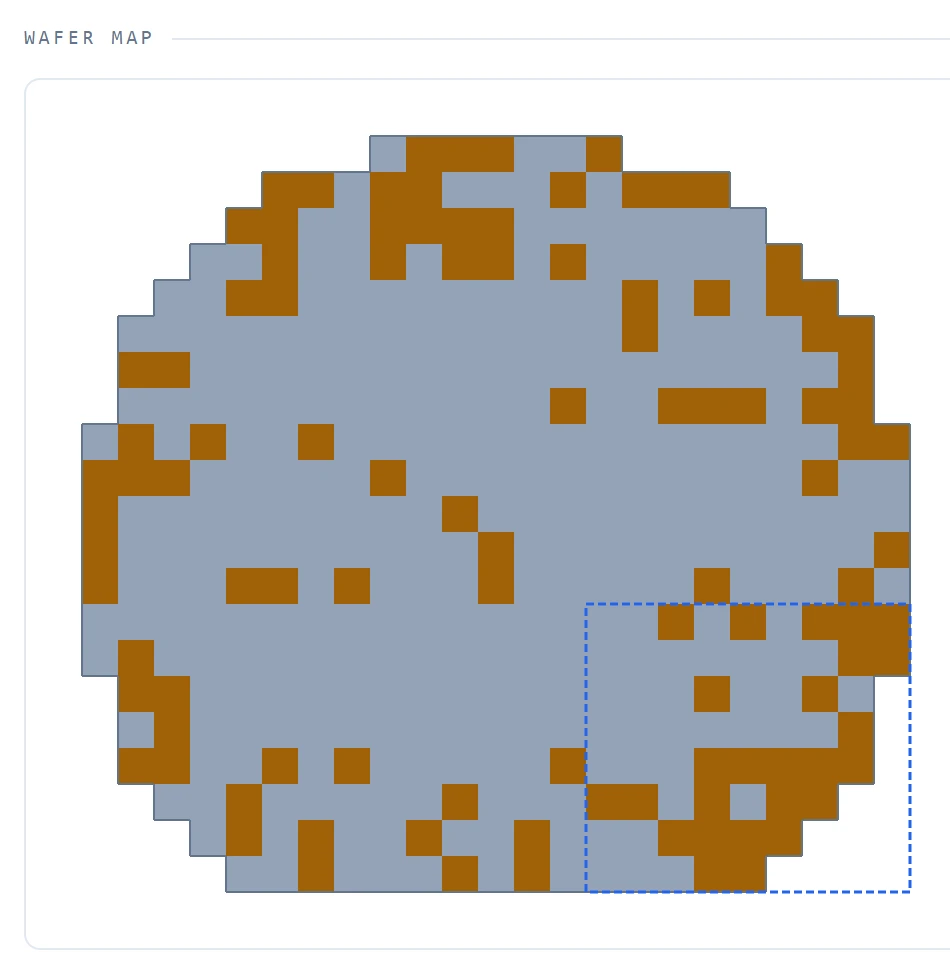
Wafer map of a demonstration wafer: fails concentrated around the rim, and a lower-right cluster marked by the detector
Wafer 1 of the demonstration wafer-sort lot (synthetic data). Fails around the rim are the planted edge signature; the dashed box is a cluster the detector marks, and it also marks clusters on wafers where none was planted.

What you can ask the agent

The questions an IG-XL engineer brings to a program every day — answered from the program in front of you and the data behind it.

Debug mode

“Will this program compile?”

It runs ATE·IQ's offline pre-flight checks on the open program and lists what it checked, and what only IG-XL itself can confirm.

Edit mode

“What does this VBT procedure do?”

It reads the module's current source from the open editor, unsaved edits included, and looks up IG-XL API and instrument facts in its built-in knowledge before it proposes a VBA change.

Edit mode

“Write a helper module for this test.”

It drafts the VBA, checks it against the IG-XL API before proposing it, and stages the whole module for your review.

Debug mode

“Did the spec's new limits reach the program and the lots?”

It sets the spec, the program's flow limit and the limit each lot ran side by side, from the same reconcile the traceability dashboard uses, and names who owns each mismatch.

Debug mode

“Why is this lot failing?”

It reads the STDF — yield by site and bin, first-fail paretos, per-test Cpk and outliers — with deterministic tools, and builds a cause chain for the test you name.

Quality tab

“Review this VBA.”

Thirty-three rules review the modules, with findings at the exact line and a development or production profile to match the stage you are at.

The agent window opens in Edit mode, with the IG-XL knowledge tools and the workbook editor; switch to Debug and it has all 35 tools and the project behind it. The Excel add-in installs per user with no admin rights. The agent's tools are validated on Anthropic models today; with another provider the chat answers without them.

Shown on the demonstration project

The figures in this section, the readouts marked ¹ and the wafer map above come from one demonstration project: a small motion sensor with a 4-wire SPI interface, taken from a structured spec to a generated program IG-XL ran, and on to nine STDF files of synthetic production data with defects planted on purpose — so every finding can be checked against what was put there. The generator and connected-model captures at the top of the page come from a separate example project for an open-source I²C core, and the agent captures from an example program; each caption says which.

Demonstration project · a small motion sensor with a 4-wire SPI interfacesynthetic lots · planted defects
  1. Spec16 requirements6 DC parametric · 10 SPI functional, each with limits and a test number
  2. Program10 IG-XL sheets · 16 tests · 12 pattern filesgenerated from the spec · cross-sheet validation 0 failures, 1 advisory · pre-flight clean
  3. Device model16 / 16 replayed clean · 80 compare cycles, 0 mismatchesa stand-in derived from the register map and a transcribed electrical pack
  4. IG-XL simulator25 / 25 datalog rows as predicted · Bin 1IG-XL's offline simulator · simulated instruments, one site
  5. Traceability16 / 16 joined spec → program → lot · 1 compliance errorthe planted guard band, added to the spec after generation, that the program never followed · presence on test number, not correctness
  6. ProductionSite 3 at 79.2 % against 93–96 % on the other sitesthe first of three final-test lots, where a socket leak was planted
Yield by site in a demonstration final-test lot: sites 1, 2 and 4 between 93 and 96 per cent, site 3 at 79.2 per cent in red
Yield by site in the first final-test lot, as ATE·IQ draws it. The site-3 drop is the planted socket leak.

Everything in the box

Generate the program and refine it with the agent; read the load board it runs on and the lots it tests. The agent reaches all four.

Test programs

Spec to IG-XL project

Sheets, VBT and patterns keyed to the spec's test numbers, checked against the VBT API and the tester setup before you see it.

Test programs

Judged by a device model

A model derived from your register map, or one you connect over ATE·IQ's own protocol, with a kit to check the connection. What it cannot judge is listed, never passed.

Test programs

Run on IG-XL's offline simulator

IG-XL's own simulator loads and runs the finished program, and the datalog is reconciled test by test against the model's prediction.

IG-XL agent

Live program context

Sheets, VBA with unsaved edits and your cursor, streamed while you work.

IG-XL agent

Edits you approve

Fields, cell blocks and whole VBA modules — previewed, applied on your click, reversible.

IG-XL agent

IG-XL knowledge in your own assistant

The IG-XL knowledge tools also run as an MCP server for the AI assistant your team already uses.

Load boards

The formats your EDA tool exports

Allegro netlist and Fabmaster, IPC-2581, ODB++, Specctra DSN, KiCad and PDF schematics, read natively.

Load boards

Checks before first power

Pin match, the 166-rule DIB check, copper DRC and a DC operating-point solve of the board's rails.

Load boards

Board exports

Gerber and Excellon, a fab package, BOM, pick-and-place, KiCad and Specctra DSN, generated from the imported design.

Production data

STDF on your machine

Yield, bins, Cpk, paretos, outlier screens and wafer maps from the binaries themselves.

Production data

Spec, program and lots, checked for agreement

Limit drift between the three is named, with the artefact that owns each number.

Platform

Local-first, your LLM

Runs on the engineer's machine with Anthropic, an OpenAI-compatible gateway or Azure OpenAI, on your keys.

Boundaries

Talk to us

The useful first conversation is a walkthrough on your device and your tester: a spec you already ship, turned into a checked IG-XL program and refined with the integrated agent — or the agent working in a workbook you already maintain. Tell us what you are working on and we will reply within one business day.